
Place Order
Create Order
Corresponding Request Class: TradeOrderRequest
Description
Trading order placement interface. For information on how to select underlying assets, order types, direction quantities, etc., please see the explanation below.
Please check whether your account supports the requested order in conjunction with the Trading Order Types section of this document before running the program, and check whether the trading rules allow placing orders for specific underlying assets during the program runtime period.
CAUTION
- Market orders (MKT) and stop orders (STP) do not support pre-market and after-hours trading. When calling the order placement interface, you need to set outside_rth to false
- Short-sellable assets currently do not support position hedging and cannot simultaneously hold long and short positions of the same underlying asset
- The main order type for additional orders currently only supports limit orders
- When the limit price does not match the tickSize, you can refer to the tickSizes field returned by the contract and use the StockPriceUtils utility class to determine if it matches, and fix the price to meet the tickSize requirements
- Market orders (MKT) and paper trading accounts do not support setting the time_in_force parameter to GTC
Order Status Description
-
How to determine the partial fill status of prime and paper trading accounts?
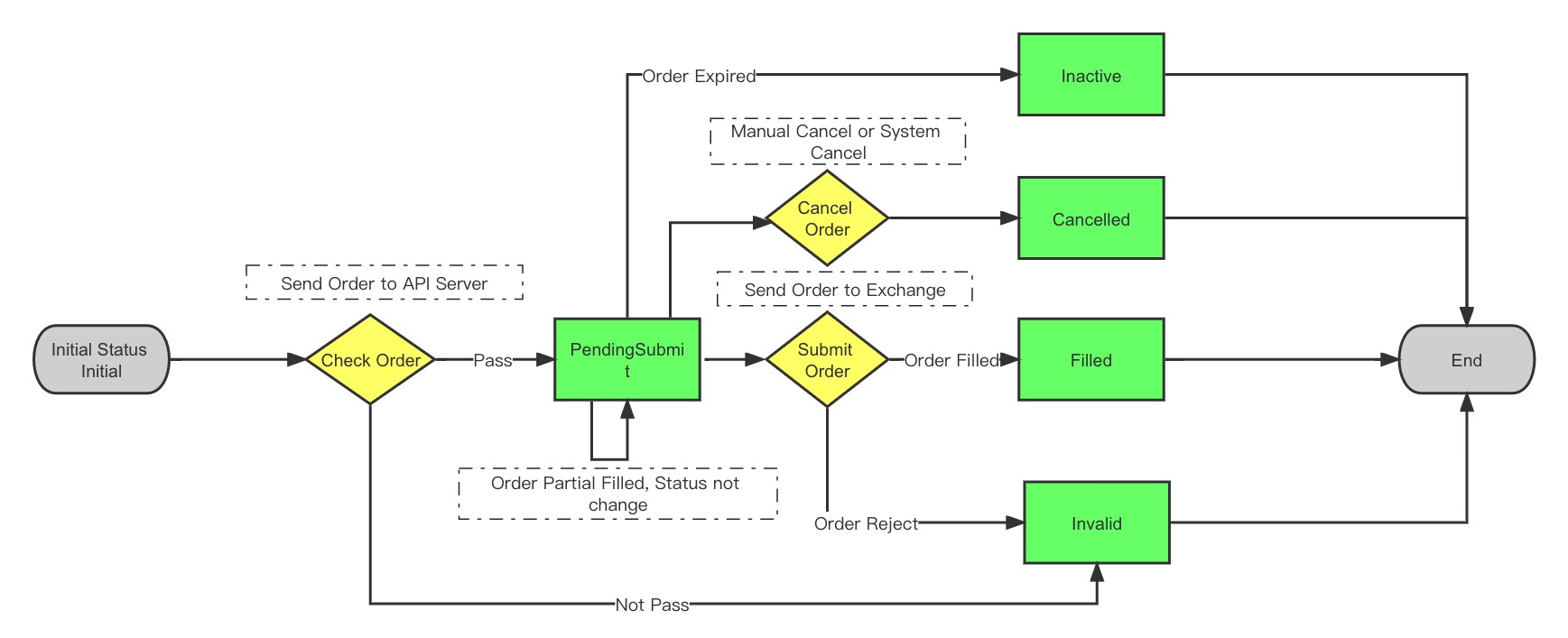
When the order status is not Initial and Filled (it may be PendingSubmit, Cancelled, Invalid, or Inactive), it may be in a partial fill status, which can be determined by whether the order fill quantity is greater than 0.
Order Status Change Flow:
Other Notes
- Direct establishment of reverse positions is prohibited. For example, when currently holding 100 shares long position, directly selling 200 shares (intending to establish 100 shares net short) will be rejected. You need to first close the existing 100 shares long position, then perform the new sell operation.
Parameters
| Parameter | Type | Description | Market Order | Limit Order | Stop Order | Stop Limit Order |
|---|---|---|---|---|---|---|
| account | string | User authorized account: 402901 | Required | Required | Required | Required |
| order_id | int | Order ID, used to prevent duplicate orders. Can be obtained through the order ID interface. If 0 is passed, the server will automatically generate an order ID. Passing 0 cannot prevent duplicate orders, please choose carefully | Optional | Optional | Optional | Optional |
| symbol | string | Stock code | Required | Required | Required | Required |
| sec_type | string | Contract type (STK stock; OPT US stock option) | Required | Required | Required | Required |
| action | string | Trading direction BUY/SELL | Required | Required | Required | Required |
| order_type | string | Order type MKT (market order), LMT (limit order), STP(stop order), STP_LMT (stop limit order) | MKT | LMT | STP | STP_LMT |
| total_quantity | long | Order quantity | Required | Required | Required | Required |
| total_quantity_scale | int | Order quantity offset, default is 0. For fractional shares, total_quantity and total_quantity_scale combine to represent the real order quantity, e.g., total_quantity=111 total_quantity_scale=2, then real quantity=111*10^(-2)=1.11 | Optional | Optional | Optional | Optional |
| cash_amount | Double | Order amount (for amount-based orders) | Optional | Not Required | Not Required | Not Required |
| limit_price | double | Limit price, required when order_type is LMT, STP_LMT | Not Required | Required | Not Required | Required |
| aux_price | double | Stock order stop trigger price. Meaning is price difference, overridden by trailing_percent when both exist. Required when order_type is STP, STP_LMT | Not Required | Not Required | Required | Required |
| outside_rth | boolean | true: Allow pre-market and after-hours trading (US stocks only), false: Not allowed, default is allowed. (Market orders, stop orders are only valid during market hours, will ignore outside_rth parameter) | Not Required | Optional | Optional | Not Required |
| trading_session_type | TradingSessionType | US stock order session (limit orders only). Enum values see: | Not Required | Optional | Not Required | Optional |
| adjust_limit | double | Price adjustment range (default 0 means no adjustment, positive numbers adjust upward, negative numbers adjust downward), automatically adjusts the input price to a legal price level. For example: 0.001 means adjust upward with a range not exceeding 0.1%; -0.001 means adjust downward with a range not exceeding 0.1%. Default 0 means no adjustment | Not Required | Optional | Optional | Optional |
| market | string | Market (US) | Optional | Optional | Optional | Optional |
| currency | string | Currency (USD) | Optional | Optional | Optional | Optional |
| time_in_force | string | Order validity period, can only be DAY (valid for the day), GTC (valid until cancelled), GTD (valid until specified time), default is DAY | Optional | Optional | Optional | Optional |
| expire_time | long | Order validity deadline, 13-digit timestamp accurate to seconds (required when time_in_force is GTC, invalid for other types) | Not Required | Optional | Optional | Not Required |
| exchange | string | Exchange (US stocks SMART) | Optional | Optional | Optional | Optional |
| expiry | string | Expiry date (options only) | Optional | Optional | Optional | Optional |
| strike | string | Strike price (options only) | Optional | Optional | Optional | Optional |
| right | string | Option direction PUT/CALL (options only) | Optional | Optional | Optional | Optional |
| multiplier | float | Multiplier, quantity per lot (options only) | Optional | Optional | Optional | Optional |
| secret_key | string | Trader key, for institutional users only | Optional | Optional | Optional | Optional |
| user_mark | string | Order comment information, cannot be modified after ordering, returns userMark information when querying orders | Optional | Optional | Optional | Optional |
Build Contract Object
// US stock contract
ContractItem contract = ContractItem.buildStockContract("XYZX", "USD");

// US stock option contract
ContractItem contract = ContractItem.buildOptionContract("XYZX  190118P00160000");
ContractItem contract = ContractItem.buildOptionContract("XYZX", "20211119", 150.0D, "CALL");
Build Orders
Market Order (MKT)
// get contract(use default account)
ContractRequest contractRequest = ContractRequest.newRequest(new ContractModel("XYZX"));
ContractResponse contractResponse = client.execute(contractRequest);
ContractItem contract = contractResponse.getItem();
// market order(use default account)
TradeOrderRequest request = TradeOrderRequest.buildMarketOrder(contract, ActionType.BUY, 10);
TradeOrderResponse response = client.execute(request);
System.out.println(JSONObject.toJSONString(response));

// get contract(use account parameter)
ContractRequest contractRequest = ContractRequest.newRequest(new ContractModel("XYZX"), "402901");
ContractResponse contractResponse = client.execute(contractRequest);
ContractItem contract = contractResponse.getItem();
// market order(use account parameter)
request = TradeOrderRequest.buildMarketOrder("402901", contract, ActionType.BUY, 10);
response = client.execute(request);
System.out.println(JSONObject.toJSONString(response));
Limit Order (LMT)
// use default account
TradeOrderRequest request = TradeOrderRequest.buildLimitOrder(contract, ActionType.BUY, 1, 100.0d);
TradeOrderResponse response = client.execute(request);
System.out.println(JSONObject.toJSONString(response));

// use account parameter
request = TradeOrderRequest.buildLimitOrder("402901", contract, ActionType.BUY, 1, 100.0d);
// set user_mark
request.setUserMark("test001");
// set GTD order's expire_time
request.setTimeInForce(TimeInForce.GTD);
request.setExpireTime(1669363583804L);
response = client.execute(request);
System.out.println(JSONObject.toJSONString(response));
Overnight Orders
US stocks only
// place overnight order in the US market
TradeOrderRequest request = TradeOrderRequest.buildLimitOrder("402901", contract, ActionType.BUY, 1, 200.0d);
request.setTradingSessionType(TradingSessionType.OVERNIGHT);
TradeOrderResponse response = client.execute(request);
System.out.println(JSONObject.toJSONString(response));
Stop Order (STP)
// use default account
TradeOrderRequest request = TradeOrderRequest.buildStopOrder(contract, ActionType.BUY, 1, 120.0d);
TradeOrderResponse response = client.execute(request);
System.out.println(JSONObject.toJSONString(response));

// use account parameter
request = TradeOrderRequest.buildStopOrder("402901", contract, ActionType.BUY, 1, 120.0d);
response = client.execute(request);
System.out.println(JSONObject.toJSONString(response));
Stop Limit Order (STP_LMT)
// use default account
TradeOrderRequest request = TradeOrderRequest.buildStopLimitOrder(contract, ActionType.BUY, 1,150d,130.0d);
TradeOrderResponse response = client.execute(request);
System.out.println(JSONObject.toJSONString(response));

// use account parameter
request = TradeOrderRequest.buildStopLimitOrder("402901", contract, ActionType.BUY, 1,150d,130.0d);
response = client.execute(request);
System.out.println(JSONObject.toJSONString(response));
Main Order + Additional Stop Loss Order
// use default account
TradeOrderRequest request = TradeOrderRequest.buildLimitOrder(contract, ActionType.BUY, 1, 129d);
TradeOrderRequest.addStopLossOrder(request, 100D, TimeInForce.DAY);
TradeOrderResponse response = client.execute(request);
System.out.println(JSONObject.toJSONString(response));

// use account parameter
request = TradeOrderRequest.buildLimitOrder("402901", contract, ActionType.BUY, 1, 129d);
// Add additional stop loss market order, the stop loss price is the trigger price (options are not supported)
TradeOrderRequest.addStopLossOrder(request, 100D, TimeInForce.DAY);
response = client.execute(request);
System.out.println(JSONObject.toJSONString(response));

// Options can use additional stop loss limit orders
ContractItem optionContract = ContractItem.buildOptionContract("XYZX", "20211231", 175.0D, "CALL");
request = TradeOrderRequest.buildLimitOrder("402901", optionContract, ActionType.BUY, 1, 2.0d);
// Add additional stop loss limit order, where the first price 1.7 is the trigger price, and the second price 1.69 is the limit price for the additional stop loss order (currently only supports live accounts)
TradeOrderRequest.addStopLossLimitOrder(request, 1.7D, 1.69D, TimeInForce.DAY);
response = client.execute(request);
System.out.println(JSONObject.toJSONString(response));
Options Multi-Leg Orders
List<ContractLeg> contractLegs = new ArrayList<>();
ContractLeg leg1 = new ContractLeg(SecType.OPT, "XYZX",
    "170.0", "20231013", Right.CALL,
    ActionType.BUY, 1);
contractLegs.add(leg1);
ContractLeg leg2 = new ContractLeg(SecType.OPT, "XYZX",
    "170.0", "20231013", Right.PUT,
    ActionType.BUY, 1);
contractLegs.add(leg2);

TradeOrderRequest request = TradeOrderRequest.buildMultiLegOrder(
    "572386", contractLegs, ComboType.CUSTOM,
        ActionType.BUY, 3,
        OrderType.LMT, 2.01d, null, null)
    .setLang(Language.en_US)
    .setUserMark("test_multi_leg");
TradeOrderResponse response = client.execute(request);
if (response.isSuccess()) {
  System.out.println(JSONObject.toJSONString(response));
} else {
  System.out.println(response.getMessage());
}
Updated 5 months ago