
Configuration
Using a .properties configuration file
For Individual Investors:
Export the configuration file tiger_openapi_config.properties from the Developer Platform (after registration, navigate to Your RSA Key > Regenerate > Receive & Input SMS Verification Code > Download), and place it in an appropriate system path, such as /Users/demo/props/.
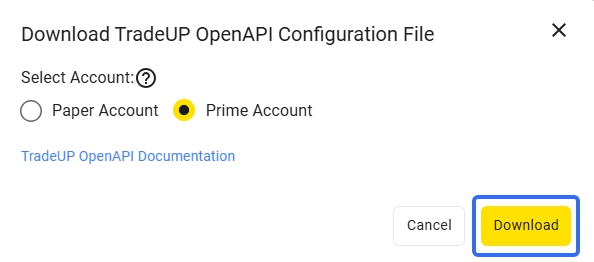
The content format of the tiger_openapi_config.properties file is as follows:
private_key_pk1=MIICeAIBADANBgkqhkiG9w0BAQEFAASCAmIwggJeAgEAAoGBAKh0zh3342PxJS7HFJtIwXE0czbeF+2MC5ev14rf7IWssYD+bHCj0dgSFiPEKBgAm3vzFvPDtqIq733fjk7yKXyezpQveZPn1CUIq7T4VmYXaDni17KqiKiXvXFwzT3oPeyzSgnMoa35u2+UHN1ytczr6lmpsrXgBJYYTi4ffegMBAAECgYBfmIGMVVOeDOFsMhABnvcL2qPWotzfI+pn4rIluCyR4t4yUILwNY7CcxAyOrFe0Chdl7F9Up2JP+UgbcljebpRHN9jAm3lVQP0t4hzI/G6PsSDa/GVnAnqyVPsNDoskJtR7U9QOUopdh7/ARQ0nd0Qn94USFHy83IWVbwMmP5rPQJBAOFDBhRkhyr71YNxJ6flKbmhLvrlssss2SmiRq759n8f03BPRT6NoQfKzBkwkFMMnjaJLwdXQy4Z20snsnMcCQQC/cWrUAccnVPLG1/9VYcFF/HfTg0WUNfzsmLu7K/W37TllhVPRTxDkJQ90EDdB7EwEp3WLoFdQf/E5jlpf5StnAkEApHt6Pv3ArSRCHb5MRI5Sz1bgpRd01Kg7dhXt8zka/Pdh6nHjGR1nV1xTe1I5sPNPrch95RoIKYZSdpbhB8ycFQJBAIw6wrqatst7sP2wGArtuQnPveID5QKEbUjNM64NrEZWkNVpTRUjakcDUod8nU0/jgtWsoZdI7gGj6bOPCrEDf8CQQCkDyuhQpe0pOoLatvyGzkCxwykcVSXtltV4pfXiACD1A9bGSHwFwHV2WMCyunuKsS2rhV7MPYJ/jRvnYVwer3r
tiger_id=20550001
account=12345678
license=TBUS
env=PROD
secret_key=
# secret_key is required for institutional clients only
For Institutional Investors:
Create your own configuration file, tiger_openapi_config.properties by inputting your developer information in the following format, then placing it in an appropriate system path, such as /Users/demo/props/:
private_key_pk1=MIICeAIBADANBgkqhkiG9w0BAQEFAASCAmIwggJeAgEAAoGBAKh0zh3342PxJS7HFJtIwXE0czbeF+2MC5ev14rf7IWssYD+bHCj0dgSFiPEKBgAm3vzFvPDtqIq733fjk7yKXyezpQveZPn1CUIq7T4VmYXaDni17KqiKiXvXFwzT3oPeyzSgnMoa35u2+UHN1ytczr6lmpsrXgBJYYTi4ffegMBAAECgYBfmIGMVVOeDOFsMhABnvcL2qPWotzfI+pn4rIluCyR4t4yUILwNY7CcxAyOrFe0Chdl7F9Up2JP+UgbcljebpRHN9jAm3lVQP0t4hzI/G6PsSDa/GVnAnqyVPsNDoskJtR7U9QOUopdh7/ARQ0nd0Qn94USFHy83IWVbwMmP5rPQJBAOFDBhRkhyr71YNxJ6flKbmhLvrlssss2SmiRq759n8f03BPRT6NoQfKzBkwkFMMnjaJLwdXQy4Z20snsnMcCQQC/cWrUAccnVPLG1/9VYcFF/HfTg0WUNfzsmLu7K/W37TllhVPRTxDkJQ90EDdB7EwEp3WLoFdQf/E5jlpf5StnAkEApHt6Pv3ArSRCHb5MRI5Sz1bgpRd01Kg7dhXt8zka/Pdh6nHjGR1nV1xTe1I5sPNPrch95RoIKYZSdpbhB8ycFQJBAIw6wrqatst7sP2wGArtuQnPveID5QKEbUjNM64NrEZWkNVpTRUjakcDUod8nU0/jgtWsoZdI7gGj6bOPCrEDf8CQQCkDyuhQpe0pOoLatvyGzkCxwykcVSXtltV4pfXiACD1A9bGSHwFwHV2WMCyunuKsS2rhV7MPYJ/jRvnYVwer3r
tiger_id=20550001
account=12345678
license=TBUS
env=PROD
secret_key=
# secret_key is required for institutional clients only
Specify the path of your tiger_openapi_config.properties file in the props_path parameter of TigerOpenClientConfig. Alternatively, you may place the configuration file in the current program directory; the SDK will default to the current path.
We have provided a sample implementation of a configuration module for reference:
from tigeropen.common.consts import (Language,        # Language
                                     Market,          # Market
                                     BarPeriod,       # K-line period
                                     QuoteRight)      # Adjustment type
from tigeropen.quote.quote_client import QuoteClient

from tigeropen.tiger_open_config import TigerOpenClientConfig

def get_client_config():
    client_config = TigerOpenClientConfig(props_path='/Users/demo/props/')
    return client_config

# Create the client_config object using the above-defined function
client_config = get_client_config()

# Initialize QuoteClient with the configuration object
quote_client = QuoteClient(client_config)

# Retrieve market data for ticker XYZX
stock_price = quote_client.get_stock_briefs(['XYZX'])
You may also download this demo project, and replace the contents of the .properties configuration file with your developer information.
Common ClientConfig Configuration Options
After initiating client_config = TigerOpenClientConfig(), you may set different configuration properties using client_config.<property>.
Some sample configuration options are as follows:
# Logging level and path
client_config.log_level = logging.DEBUG  # Requires `import logging`
client_config.log_path = '/tmp/tigerapi.log'

# Language
client_config.language = 'en_US'
# Timezone (If a timezone is set, time-related string parameters will be processed as this timezone. By default, SDK does not set a timezone, and the server assumes US/Eastern time.)
client_config.timezone = 'US/Eastern'

# API timeout
client_config.timeout = 15
# Retry settings
# Maximum retry duration in seconds
client_config.retry_max_time = 60
# Maximum number of retry attempts
client_config.retry_max_tries = 5

# 2FA token refresh interval in seconds. Set to 0 to disable automatic refresh
client_config.token_refresh_duration = 24 * 60 * 60
Updated 6 months ago